HostGator Introduction
HostGator is an American hosting company founded in Florida in 2002. It has two offices in Texas in the USA, and two additional offices in Brazil. HostGator was independently owned until 2012, when it was sold to the Endurance International Group. The CEO prior to the acquisition was Brent Oxley, who still owns some of the buildings that the company operates out of.
HostGator has always been about low prices and generous resources, and it offers every type of web hosting that a business is likely to need. In 2013, HostGator passed a new milestone: 400,000 active customers, and still growing.
HostGator Package Details
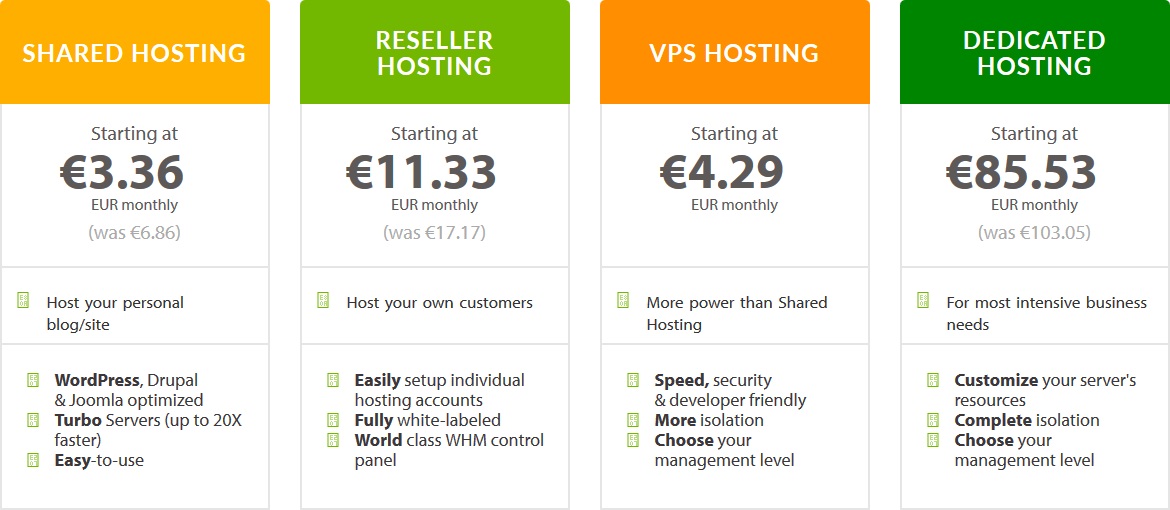
HostGator offers shared, cloud, reseller, VPS, and dedicated hosting. It also markets cloud packages, special application hosting, and plans for Windows. This huge catalog of different hosting types ensures that it’s got a service to suit pretty much any use case or website.
The top two shared hosting plans run on Linux servers and offer unlimited bandwidth and space, within fair usage guidelines. The lowest cost plan is limited to a single domain, and is most suited for people who only want to host one site, or need a shared hosting account just to learn the basics. There’s also a cloud version of shared hosting which is slightly more expensive, but HostGator promises better speed and more generous resources on its cloud plans, so they are worth considering for growing businesses. Additionally, HostGator sells two shared hosting packages on Windows servers with similar specs to the Linux plans.
If you simply want to run a WordPress blog, its WordPress cloud hosting is probably more suitable. You can install one, two, or three WordPress websites, depending on the package you choose, and HostGator provides free migration from your old provider.
Reseller hosting is not a cloud package, but includes unmetered resources and cPanel. You can set up private nameservers so that your reseller business presents a fully branded image to its customers.
VPS and dedicated servers offer good value for the money at HostGator. If you need a VPS, there are fully managed and semi-managed options. Dedicated servers are managed, with a choice of CentOS Linux or Microsoft Windows Server 2012 R2.
HostGator’s Control Panel
If a control panel is provided with your HostGator account, it’ll likely be cPanel on Linux, or Plesk on Windows. Cloud hosting plans include a proprietary dashboard instead.
If you’re used to using something like cPanel, note that semi-managed VPS hosting doesn’t include a control panel at all. You could install one yourself, if you know what you’re doing, but there won’t be any control panel out of the box. You should only opt for this kind of plan if you know your way around a Linux server without assistance.
HostGator Infrastructure
HostGator’s datacenters are split over two states. Some are located close to its offices in Houston, Texas at CyrusOne West. The Houston facility is located 20 minutes from downtown in a cluster of three facilities. The host also has servers in the Ace Data Centers facility in Provo, Utah, which has multiple Tier 1 and Tier II carriers.
HostGator does not allow customers to choose the datacenter used for their websites, and it does not allow customers to switch datacenters. In hosting terms, its facilities are relatively close together, and will offer the best speeds to customers located in North America. Its CDN service may help to improve speeds if you are further away.
Technical Support
HostGator provides support via live chat and phone. It doesn’t disclose the physical location of its support team. HostGator’s busy forum is a useful resource if you need to look up FAQs or see comments from other customers.
Support is provided 24/7, 365 days a year, so you should never have an issue getting hold of someone if you have a question or problem. If you prefer to write your queries in an email, it has a full ticket system for this purpose.
Uptime and Money-Back Promises
HostGator runs a 45-day money-back guarantee offer, and this applies to shared, reseller, and VPS hosting accounts. To be eligible, you must not have paid by check, money order, or bank wire, and you must cancel by filling out the correct form.
Its uptime guarantee is 99.9% on shared and reseller accounts. HostGator’s Terms of Service document says that downtime “may” result in a credit of one month’s service, although it isn’t exactly clear whether there are incremental credits or one blanket credit. Dedicated servers have a separate network uptime guarantee, which is detailed elsewhere on the site.
Summary
HostGator is one of the world’s biggest hosting brands, known for its massive scale of operations, and broad range of hosting services. HostGator really excels in offering unmetered resource on low-cost plans, but take care to get a managed solution if you aren’t technically proficient. Some of HostGator’s competitors allow customers to choose a datacenter, and this is one area where HostGator could probably do more for its non-US customers. But if you just want solid all-round hosting from a very well known brand, HostGator will give your site, and your business, room to grow.
Pricing
Shared Hosting


WP Engine Introduction
WP Engine is a relatively young hosting company, founded in 2010. It’s based out of Austin, Texas, and it was started by Jason Cohen. He now serves as the company’s CTO.
The company offers managed hosting plans for any number of WordPress installs.
WP Engine Plans
WP Engine’s pricing model is slightly different to competing shared hosting providers. It’s based on a combination of factors: the number of WordPress instances, the number of visits per month, and the amount of disk space you need. All plans, except the Premium and Dedicated packages, are based on a shared hosting infrastructure in a Xen virtualized environment.
The Personal plan covers one install, the Professional plan lets you create 10, and the Business plan has capacity for 25. If you need more than 26 installs, WP Engine will discuss a custom pricing for its Premium or Enterprise plans. A CDN is included with all plans except the Personal tier.
These plans assume that your usage is average for the size of your site. If you experience a traffic spike, or your site is very popular, you may need to pay more for additional monthly visits. WP Engine says that one IP address in one 24-hour period is a “unique” visit, and that’s how your bills are calculated. Bandwidth on all plans is unmetered. You won’t get a traditional control panel like cPanel, and there’s no root or SSH access. Instead, you get a web dashboard with access to account controls and phpMyAdmin.
WordPress Features
Because WP Engine is a WordPress-only host, it’s able to offer specialized hosting features that are not always offered by rival hosts. It provides extra control and a degree of automation, without changing the experience for your visitors.
WP Engine gives you a tool to create snapshot backups, which is handy when trying a new plugin or theme. WP Engine also takes its own daily backups, and adds its own menus to the WordPress admin section. All plans include the ability to spawn a staging site, so you can work on a clone of your live site, and then set the clone live if you’re happy with the changes. This avoids messing up your live site if you’re testing something out.
The dashboard supports transferable installs, so you can move a finished site to someone else’s account. This feature is designed for web developers who need to push completed sites to their clients’ WP Engine accounts.
WP Engine does not provide free migrations with new signups, but it does have an automated WordPress importer plugin. This does a good job of transferring content from another server.
Finally, note that WP Engine does prohibit some plugins on its servers. You can ask support if you want to check that all of your plugins are allowed.
Infrastructure and Datacenters
WP Engine’s datacenters are located in the USA, the UK, Belgium, Ireland, and Asia. You can choose the datacenter closest to you and your customers for the fastest page load times.
The host also has its own caching plugin, Evercache, which it claims will load WordPress content 4-6 times faster than rival hosts. Its CDN — available on all but the cheapest plan — is provided by NetDNA.
One quirk of WP Engine is that it prefers customers to point CNAME records at its WP Engine domains, rather than changing nameservers. It recommends that you use CloudFlare for your DNS, as it support CNAME flattening.
If you need help, WP Engine offers support by live chat, phone, and ticket, although the ticket system is more difficult to locate. It also has a library of help documentation to cover frequently asked questions.
Uptime and Money-Back Promises
WP Engine provides a 60-day money-back guarantee. This guarantee applies to core services, and not additional services like domain names or paid migration.
It’s important to remember that other hosts are unlikely to help you to move away from WP Engine, so you’ll need to do this manually if you decide not to continue with its service. You will need to obtain your site backup file, adjust the file structure, and replace some core files. This isn’t a tough job, but just something to bear in mind.
The company guarantees 99.95% service availability. It offers a 5% credit for downtime exceeding 0.05%, providing the customer writes in within 30 days.
Summary
WordPress is one of the most powerful CMS applications on the planet, and has earned its place as the web’s favorite blogging platform. WP Engine takes some of the headache out of using WordPress in a business or corporate context. Jason Cohen believes that WP Engine has been instrumental in promoting WordPress as an enterprise platform, and that is probably why. It handles updates, caching, security, and backups, so you can get on with important business tasks instead.
Remember that migrating out can be trickier than usual, and make sure your site doesn’t rely on any prohibited plugins. For the fully-managed WordPress experience, WP Engine is by far the biggest and best known host out there today.